Practical workflow improvement for small businesses

Make work simpler.

I help small businesses find repetitive, inefficient workflows, simplify the process, and automate the parts that make sense, so people can spend less time assembling information and more time using it.

You don’t need to know the technical answer. You only need to show me the work.

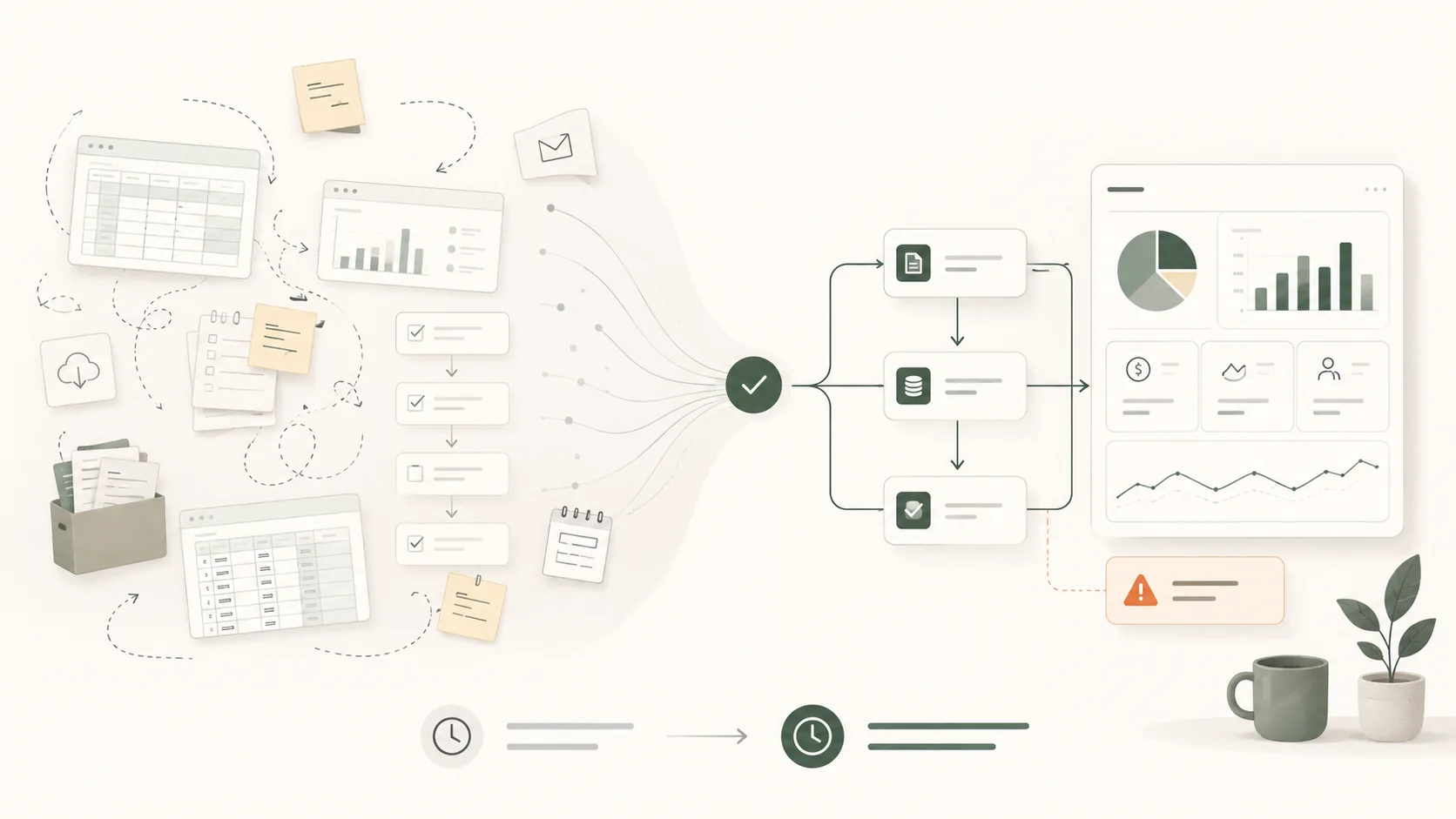
Illustration showing scattered manual spreadsheets, reports and tasks becoming a simpler automated workflow with useful reporting and exception alerts.
From scattered manual work to a clear workflow that surfaces what needs attention.

Does any of this sound familiar?

The biggest opportunities often hide inside everyday jobs everyone has simply got used to doing.

“Every Monday I have to put this report together.”
“We enter the same information in two different places.”
“Someone has to remember to check this every day.”
“It works... but it’s a very manual process.”
Those are the kinds of problems I’m interested in.

What I look for

The work behind the work.

I’m looking for the quiet operational patterns that make a business feel busier than it needs to be: duplicated effort, unclear hand-offs, manual checks, and reports that take longer to prepare than to use.

01

Duplicate entry

The same information is typed, pasted or corrected in more than one place.

02

Recurring reports

Someone rebuilds the same spreadsheet or summary before anyone can make a decision.

03

Manual checks

People keep checking systems because there is no reliable exception view.

04

Hidden systems

A spreadsheet has quietly become a business-critical process without the guardrails.

05

Lost hand-offs

Work moves between people, inboxes or systems and context has to be recreated each time.

06

Inherited effort

Tasks continue because “that’s how we do it”, not because they still add value.

Workflow spotter

Where does the time disappear?

Pick a pattern and see the kind of operational question I would start with.

Question I’d ask: What decision does this report support, and which parts are just assembly work?

How I work

The aim isn’t to automate everything. It’s to understand the real process, remove unnecessary work, then use technology where it genuinely improves things.

01 / UNDERSTAND

Show me how it actually works.

I look at the real workflow, including the workarounds, spreadsheets and manual steps that don’t appear in the procedure.

02 / SIMPLIFY

Remove what doesn’t need to happen.

Sometimes the best improvement is combining steps, using an existing feature properly, or simply stopping unnecessary work.

03 / AUTOMATE

Let the systems do the repetitive parts.

Where automation genuinely helps, I build a practical workflow around the systems your business already uses.

04 / HAND OVER

Your workflow. Your data.

The finished solution is tested, documented and handed over. Ongoing support can be added if you want it, not because you’re locked in.

Four-stage illustration showing understand, simplify, automate and hand over as a connected workflow improvement process.
Understand the real process, simplify it, automate where useful, then document and hand it back.

A simpler operating shape

The improvement is not just fewer clicks.

A good workflow change moves effort away from assembling information and towards using it. This is the difference I’m usually trying to create.

Manual shape

Collect → copy → calculate → check → report

Open dashboards Copy numbers Clean spreadsheet Check exceptions Send update

People spend most of their energy preparing the view before they can use the information.

Fewer touchpointsLess copying, re-keying and chasing.
Earlier signalUseful information appears sooner.
Clearer ownershipPeople know what needs attention.

Start with one process.

You don’t need a transformation programme. A useful first project can simply be one recurring piece of work that takes too much time.

Workflow Review

Find what’s worth fixing.

We take one repetitive or frustrating process and work through what happens now, where time is being lost, and what could realistically be improved.

  • Current workflow mapped out
  • Manual effort and duplication identified
  • Simplification opportunities
  • Automation opportunities
  • Recommended next steps
Workflow Build

Make the improvement real.

If there is a worthwhile opportunity, I can design, build and test the agreed solution, then document it and hand it back to your business.

  • Recurring reports
  • Enquiry and booking workflows
  • Moving information between systems
  • Notifications, reminders and exceptions
  • Spreadsheet and data processes

What a review produces

A clearer view of the work.

A Workflow Review should leave you with something useful, not a vague recommendation to “automate more”. The output is a practical map of what is happening and what is worth changing.

Workflow Review Example output

Current process summary

Where the work starts, who touches it, which systems are involved, and what happens before the useful result appears.

Friction points

  • Repeated copy/paste between systems
  • Manual checks with no exception view
  • Spreadsheet logic only one person understands

Recommended next step

Simplify the hand-off first, then automate the repeatable collection and exception summary.

Common first projects

Weekly reportingPulling figures together before the useful conversation can start.
Enquiry hand-offsCustomer or booking details moving manually between inboxes and systems.
Spreadsheet clean-upFiles that need routine sorting, checking, combining or reformatting.
Stock or order checksRepeated checks that could become a useful exception list.
Recurring messagesUpdates, reminders or confirmations being rewritten again and again.
“Not sure” reviewsA broader look at where admin effort is quietly building up.

Operations first, technology second

Technology isn’t the starting point.

I don’t arrive with a particular platform I want to sell you. I start with how your business actually works.

Sometimes the answer is automation. Sometimes it’s a better spreadsheet, an existing feature nobody is using, a simpler process, or stopping a task that no longer needs doing.

Where technology is useful, the right tool depends on the job and the systems you already use.

Real example, anonymised

When growth broke the spreadsheet.

A multi-location operation had a reporting process that worked at a smaller scale, but became increasingly unrealistic as the number of locations grew.

20 → 100+locations as the operation grew
1+ hourmanual collection each morning at around 20 locations
Multiple inputsperformance, scheduling and weekly data
One aimget useful information to people faster
Anonymised case study illustration showing a manual reporting process at 20 locations becoming an automated workflow that scales beyond 100 locations and highlights exceptions.
An anonymised visual summary of the reporting problem: manual collection at around 20 locations versus automated processing designed to scale beyond 100.

The situation

A process that didn’t scale.

Every morning, one person manually opened a separate performance dashboard for each location, copied the required metrics, and pasted them into a transformation spreadsheet.

A separate process handled scheduling information by importing and combining data from other sheets, while additional weekly information was entered manually.

At around 20 locations, the morning collection process alone was already taking more than an hour. As the operation moved towards 100 locations, simply repeating the same process five times over was not realistic.

The problem

The workflow worked, until growth exposed the cost.

The issue wasn’t that the process was broken. It was that a once-manageable process had become increasingly time-consuming, repetitive and vulnerable to manual mistakes as the operation expanded.

More locations meant more repetitive work
Copying data created opportunities for mistakes
Useful information was delayed by collection effort
People spent time assembling data instead of acting on it

Before

Collect → copy → calculate → report

Location dashboards

Manual collection

Transformation spreadsheets

Schedule and supporting data imports

Calculations and comparisons

Find the problems

Produce and send reporting

After

Collect automatically → surface what matters

100+ locations

Automated collection

Clean, combine and calculate

Exception detection

Scheduled summaries

People review, understand and act
Scales with the operation

Growth no longer requires the reporting workload to increase at the same rate.

Fewer manual touchpoints

Routine copying and re-keying are reduced, lowering the opportunity for transcription errors.

Information arrives sooner

Scheduled processing means useful reporting can be ready before people need to start acting on it.

Attention moves to exceptions

People spend more time using information and less time assembling it.

What mattered most Don’t automate the clicks. Understand why the clicks exist.

The goal was never to open dashboards faster. The goal was to create a reliable view of performance and highlight where attention was actually needed.

About

Built from real operations.

Hi, I’m Niki. My background is in high-volume retail and e-commerce operations.

Over time, I became increasingly interested in the work behind the work: why people were repeatedly checking the same information, manually creating the same reports, or spending time moving data between systems.

I started building tools to remove those repetitive tasks and surface the information people actually needed. This service grows from that combination of operational experience and automation: understand the process first, then use technology where it genuinely makes the work better.

Start a conversation

Not sure what’s consuming time?

You don’t need to know what should be automated, or even where the biggest opportunity is.

If you already have a process that starts with “it’s a bit of a weird one...”, tell me about it. Or let me take a look at how the work gets done.

I can review the everyday workflows, repetitive admin, reporting and hand-offs in your business to identify where time is being lost, what could be simplified, and where automation might genuinely help.

Sometimes the best opportunities are the jobs everyone has simply got used to doing.

Illustration of a small business workflow review, with people mapping processes, notes, spreadsheets, hand-offs and recurring tasks together.
The starting point can simply be watching how the work actually happens.

Start with the work. The extra details appear once there is something to work from.

A few useful details help me understand the shape of the workflow.
Where are you starting from?

Your message goes to Niki. No technical solution needed before you get in touch. You can also email info@nikicooke.com.